Car Photo Checklist app icon Car Photo Checklist
Built around real auction photo standards

Take every car photo your listing needs — in one guided session.

Car Photo Checklist is the iOS app that walks you through every required angle for Cars & Bids, Bring a Trailer, eBay Motors, dealer inventory, rentals, and insurance.

Download on the App Store

Free first checklist · No sign-up · 21 MB · iOS 18.6+

Compatible with photo requirements from
Cars & Bids · Bring a Trailer · eBay Motors · Facebook Marketplace · Craigslist · Carvana
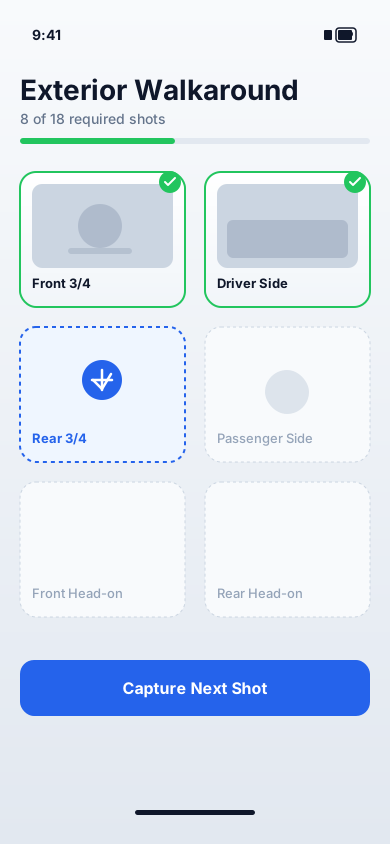
Car Photo Checklist app dashboard on iPhone showing an exterior walkaround checklist with shot cards.

Quick answer

Car Photo Checklist is an iOS app that walks you through every required car photo angle for selling, listings, auctions, and documentation. For a strong online listing, take 20–40 photos covering: front, rear, both sides, front 3/4, rear 3/4, full interior, odometer, engine bay, trunk, all four tires, and close-ups of any damage. The free tier covers one complete checklist plus one PDF export; Pro is $9.99 for unlimited use. All photos remain on your device.

How it works

Three steps from car parked to listing ready.

No training required. Anyone on your team can follow it perfectly.

Car Photo Checklist dashboard showing an exterior walkaround checklist with progress and shot cards.
Step 01

Pick a vehicle profile

Start a new checklist for the car you are listing. The checklist adapts to that vehicle’s required angles — sedan, SUV, EV, or classic.
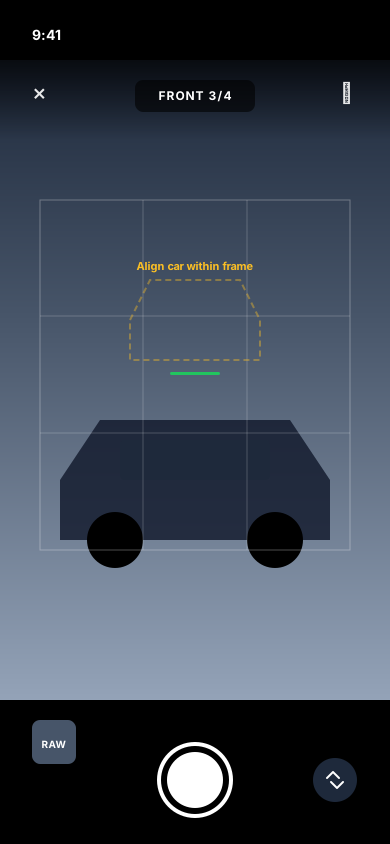
In-app camera viewfinder showing the Front 3/4 framing reference and capture button.
Step 02

Capture each required angle

A camera viewfinder shows what to shoot next, in the right order. Tap to capture; the checklist ticks off automatically.
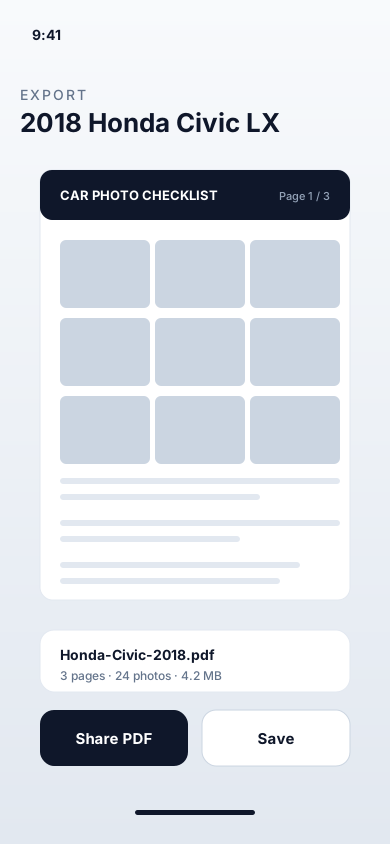
Export view showing a paginated PDF preview with the captured photo grid ready to share.
Step 03

Export a shareable PDF

Get a clean, captioned photo set ready for any listing or platform. Email, AirDrop, or save to Files in one tap.

Features

Built to be the only car photo workflow you need.

Required-angle enforcement

Every standard exterior and interior angle is checklisted in the correct order. Skip-protection prevents missed shots.

Built around major platforms

Sized and ordered to satisfy Cars & Bids, Bring a Trailer, eBay Motors, Facebook Marketplace, and Carvana.

One-tap PDF export

A clean, captioned PDF you can attach to any listing. Page-numbered, brand-consistent, dealer-ready.

Privacy-first storage

Photos stay on your iPhone. No upload, no sync, no account. Apple’s “Data Not Collected” label confirms it.

Re-export anytime (Pro)

Buyer asked for more shots? Open the saved checklist, add the photos, and re-export instantly.

Dealer & fleet workflow (Pro)

Standardize capture across porters and managers. Every car looks like it was shot by the same person.

Use cases

One proven process. Any seller.

Private sellers

Cars & Bids · BaT · eBay · Facebook

  • Avoid rejected listings and reshoots
  • Save $200–$500 on a professional photographer
  • Follow a checklist used by serious sellers
Private seller guide

Dealers & fleets

Multi-person operations

  • Standardize photos across the team
  • 8–12 cars per porter per shift
  • Zero-training onboarding
Dealer workflow

Rental & fleet ops

Pickup & return handover

  • Stop pre/post-rental damage disputes
  • 20-photo handover in 10 minutes
  • Renter sign-off attaches to the contract
Rental workflow

Insurance & lease return

Defensible documentation

  • Timestamped PDF accepted by major insurers
  • Dispute wear-and-tear charges with evidence
  • Hail, flood, vandalism, theft documentation
Documentation guides

Pricing

Try free. Upgrade when you sell more than one car.

No account, no email required to start.

Free

Get started
$0 / forever
  • 1 complete car photo checklist
  • 1 PDF export
  • All platform templates included
  • On-device privacy
  • No sign-up. No email. No tracking.
For repeat sellers & dealers

Pro

$9.99 / subscription

Billed by Apple. Cancel anytime in Settings.

  • Unlimited checklists
  • Unlimited PDF exports
  • Edit & re-export past projects
  • Dealer & fleet workflow
  • All Free-tier features

Privacy

Your photos stay on your iPhone.

Listings can contain license plates, VINs, garage addresses, and personal items. Car Photo Checklist never sends any of it off your device.

On-device only

No upload, no sync, no cloud backup.

No sign-up

No email, no account, no password.

No tracking

No analytics SDKs, no advertising IDs.

Apple verified

"Data Not Collected" privacy label on App Store.

Why we built this

Built from a real seller’s headache.

When I tried to sell my own car on Cars & Bids, the photo process was painful: endless requirements, missed angles, reshoots, and a $300+ quote from a photographer just to shoot a daily-driver Civic.

So I built the checklist I wished I’d had. On my first sale with it I skipped the photographer, the listing was approved without revisions, and the car sold above estimate.

That’s the only goal here: take the back-and-forth out of car photography for sellers, dealers, and anyone who needs consistent documentation.

— Jiu Hong Deng, Founder, Car Photo Checklist

Read the full story

Guides & resources

Long-form guides for every selling scenario.

Written for private sellers, dealers, and anyone documenting a vehicle.

Sell My Car Photos

What 20–40 photos a private seller needs.

Read guide

How Many Photos Do You Need?

Platform-by-platform comparison: 12 to 150 photos.

Read guide

Facebook Marketplace Car Photos

15–25 photos that drive Facebook inquiries.

Read guide

Cars & Bids Photo Guide

Auction-specific requirements broken down.

Read guide

Bring a Trailer Photo Guide

80–150 photos plus walkaround video for BaT.

Read guide

For Dealerships

Standardize photo capture across your lot.

Read guide

eBay Motors Photo Guide

The 24-photo strategy that drives bids.

Read guide

Craigslist Car Photos

24-photo strategy beating compression.

Read guide

Carvana Sell Photo Guide

Protect your offer with pickup-day photos.

Read guide

CarMax Photo Guide

Online offer vs in-person appraisal.

Read guide

AutoTrader Photo Guide

30 photos that drive AutoTrader clicks.

Read guide

Cars.com Photo Guide

Stand out against dealer listings.

Read guide

OfferUp Car Photo Guide

Maximize the 12-photo budget.

Read guide

Insurance Claim Photo Guide

Defensible evidence for claim adjusters.

Read guide

Rental Fleet Documentation

Pickup & return photos that stop disputes.

Read guide

Lease Return Photo Guide

Dispute wear-and-tear charges with evidence.

Read guide

Used Car Photo Checklist

Buyer and seller checklist.

Read guide

Car Photography Angles

Every standard exterior and interior angle.

Read guide

How to Take Great Photos

Lighting, composition, framing fundamentals.

Read guide

Free Printable PDF

Downloadable checklist for the field.

Read guide

Vehicle Photo Guides

Model-specific guides: Civic, Camry, F-150, M3, Miata…

Read guide

Sell by State

CA, TX, FL, NY, PA — DMV-specific guidance.

Read guide

FAQ Hub

50+ answers organized by topic.

Read guide

Glossary

Every car photography term defined.

Read guide

Trade-In Photo Protection

Lock in your dealer offer with pickup-day photos.

Read guide

Vehicle Handover

20-photo set + mutual sign-off at delivery.

Read guide

Title Transfer Records

Federal odometer law and post-sale evidence.

Read guide

Personal Car Records

Annual baseline for insurance and theft protection.

Read guide

Auto Shop Intake

Prevent shop-vs-customer damage disputes.

Read guide

Car Export Documentation

40+ photo international sale workflow.

Read guide

EV Photo Checklist

Battery health, charge port, FSD hardware.

Read guide

Night Car Photography

When to skip night photos (usually).

Read guide

Best Time of Day for Car Photos

Golden hour and overcast wins.

Read guide

iPhone Camera Settings for Cars

Defaults work — here is what to change.

Read guide

App vs Photographer

When to hire a pro vs do it yourself.

Read guide

Classic Car Photos

60–120 photo BaT-grade documentation for vintage.

Read guide

Pickup Truck Photos

Bed, undercarriage, hitch — 28–40 photos.

Read guide

Sports Car Angles

Stance, hero, and wheel detail technique.

Read guide

Winter Car Photos

AWD opportunity + snow background strategy.

Read guide

Indoor / Garage Photography

When forced indoors — single-source lighting.

Read guide

Sunny Day Car Photos

Beating harsh light — open shade strategy.

Read guide

iPhone Tripod for Cars

The $20 accessory that levels up consistency.

Read guide

Car Photography Lighting

Soft daylight wins — equipment worth buying.

Read guide

Cars & Bids vs Bring a Trailer

Auction site decision framework.

Read guide

Facebook Marketplace vs Craigslist

Cross-list both for max buyer pool.

Read guide

Frequently asked

Answers, before you ask.

What photos do I need to sell a car?

Take 20–40 well-lit photos covering: front, rear, both side profiles, front 3/4, rear 3/4, full interior (dash, seats, console, infotainment), the odometer, the engine bay, the trunk or cargo area, all four tires, and close-ups of any scratches, dents, chips, or wear. Car Photo Checklist walks you through these angle-by-angle so nothing is missed.

How many photos should I post for a Facebook Marketplace car listing?

Facebook Marketplace allows up to 50 photos, but 15–25 is the sweet spot for private sellers. The first 5–10 photos are what most buyers see in detail. Lead with a front 3/4 hero shot. See our Facebook Marketplace photo guide for the full strategy.

How many photos for a Cars & Bids submission?

Most approved Cars & Bids listings include 40–70 photos covering every exterior angle, full interior, engine bay, trunk, odometer, all four wheels, and clear close-ups of every flaw. See our Cars & Bids photo guide for the complete checklist.

Will the app help with Bring a Trailer listings?

Yes. BaT typically expects 80–150 photos plus a 60–90 second walkaround video. The app’s auction template covers BaT’s expected shot list and exports a captioned PDF you can attach to your submission. See our Bring a Trailer photo guide.

What is the best order to photograph a car in?

Exterior first (6–8 shots starting with the front 3/4 hero), then interior (5–7 shots starting with the dashboard), then proof shots (odometer, engine bay, trunk, all four tires), then condition close-ups of every flaw. This order is the fastest way to avoid missed angles.

What time of day should I take car photos?

Early morning or late afternoon (golden hour) gives the most flattering light. Overcast days are also excellent because shadows are soft. Avoid noon sun, which creates harsh shadows under wheel arches and blown highlights on paint.

How do I photograph the odometer?

Turn the car on so the cluster lights up. Stand outside the driver door, frame just the cluster, and focus on the digits so the mileage is unmistakably readable. This is the most-checked photo by buyers and auction reviewers.

Is the app really free?

Yes. The first complete checklist and the first PDF export are free with no sign-up, no email, and no payment details. Pro ($9.99) unlocks unlimited checklists, unlimited exports, re-export of older projects, and dealer / team workflow.

What is the difference between Free and Pro?

Free gives you one complete checklist and one PDF export. Pro ($9.99) gives unlimited checklists, unlimited PDF exports, edit and re-export of past projects, and the dealer / fleet workflow.

How do I cancel Car Photo Checklist Pro?

Open iOS Settings → tap your Apple ID → Subscriptions → Car Photo Checklist → Cancel Subscription. The cancellation takes effect at the end of the current billing period; the app reverts to the Free tier with no data loss.

Do I need a tripod or professional camera?

No. A modern iPhone in soft daylight is more than enough. Good light, level framing, and a consistent shot order matter far more than gear.

What iPhone camera settings should I use for car photos?

Default settings work for almost everyone. Tap to focus on the car body, lower exposure slightly if the sky is blown out, and keep HDR on. Skip Portrait mode — it crops to the subject and you need full vehicle context for listing photos.

Do my photos leave the device?

No. All photos and checklist data stay on your iPhone. The app does not upload to any server, sync to any cloud, or share with any third party. Apple verifies this with the “Data Not Collected” privacy label.

Is Car Photo Checklist legit, and who builds it?

Yes. Car Photo Checklist is published on the Apple App Store (ID 6757093466) and built by Jiu Hong Deng, an independent developer who personally responds to support. It is not affiliated with Cars & Bids, Bring a Trailer, eBay Motors, Apple, or any marketplace.

Should I hire a photographer instead of using this app?

For most private sellers, an app and an iPhone produce sufficient quality at zero cost. A professional photographer ($200–500) makes sense mainly for high-value enthusiast cars on Bring a Trailer or Cars & Bids where presentation directly affects sale price. For volume listings, the app is the better tool.

Which devices and iOS versions are supported?

iPhone running iOS 18.6 or later, iPad on iPadOS 18.6+, Mac with Apple Silicon on macOS 15.6+, and Apple Vision Pro on visionOS 2.6+.

Does Car Photo Checklist work offline?

Yes — completely. The app does not require an internet connection. Capture, checklist progress, and PDF export all work offline. The app does not use iCloud sync.

Can dealerships use this on their lot?

Yes. Pro is designed for multi-vehicle operations: re-usable templates, consistent capture order across porters and managers, and PDF exports that any team member can produce identically.

Can I use this for insurance claims, rental returns, or lease return inspections?

Yes. The structured photo set and timestamped PDF export are well-suited to insurance claims, rental car handovers and returns, and lease return inspections where you need a defensible record of condition at a specific point in time.

Why does my auction-site listing keep getting rejected?

The most common reasons are missing 3/4 angles, an unreadable odometer photo, missing wheel close-ups, no engine bay or undercarriage (BaT), and hidden flaws. Every angle reviewers expect is enforced in the app, so following the checklist generally clears most rejections on the first submission.

Will you add an Android version?

iOS is the current focus. A free printable PDF version of the checklist is available for any platform from our PDF download page. To request Android, email [email protected].

How do I report a bug or request a feature?

Email [email protected] and you will get a reply directly from the founder.

Get your listing approved — the first time.

A guided checklist built around real auction standards. Free first checklist. No sign-up. No tracking.

Download on the App Store

iOS 18.6+ · iPad & Apple Silicon Mac & Vision Pro supported

Privacy Policy

Last Updated: 2026-05-19

Car Photo Checklist ("we", "our", or "us") respects your privacy. This policy describes how the Car Photo Checklist iOS app and the website at carphotochecklist.com handle data.

1. iOS app

All photos and checklist data you create in the Car Photo Checklist iOS app are stored locally on your device. The app does not upload photos to our servers, does not sync to any cloud, and does not require an account. We do not collect, track, or transmit your photos, location, contacts, or any personal data.

Subscription purchases are handled entirely by Apple. We receive only anonymous purchase confirmation from Apple; we do not receive payment details.

2. Website

carphotochecklist.com uses Google Analytics 4 to measure aggregate traffic. We do not collect names, emails, or contact details from visitors. Analytics data is anonymized by IP truncation per Google's defaults. We do not run advertising trackers or third-party retargeting.

3. Email support

If you email [email protected], we will only use your message to reply to your support request and will not add you to any mailing list.

4. Your rights

Because we do not collect personal data from the app, there is no profile to access, correct, or delete. For website analytics opt-out, use a browser extension or do-not-track setting.

5. Contact

Email us at [email protected] for any privacy question.

Terms of Service

Last Updated: 2026-05-19

Please read these Terms before using the Car Photo Checklist iOS app or website.

1. Agreement

By using the Car Photo Checklist app or this site you agree to these Terms. If you disagree, please do not use the Service.

2. Your content

You retain all rights to the photos and checklists you create. The app stores them on your device. You are responsible for how you use exports — including obtaining any permissions needed to photograph and list a vehicle.

3. Subscriptions

Pro is an auto-renewing subscription billed by Apple. Manage or cancel any time in your Apple ID subscription settings. The free tier (1 checklist + 1 PDF export) is available without a subscription.

4. No warranty

The Service is provided "as is". Photo requirements of third-party marketplaces (Cars & Bids, Bring a Trailer, eBay Motors, etc.) may change at any time and acceptance of any listing is at the sole discretion of that marketplace.

5. Limitation of liability

To the maximum extent allowed by law, Car Photo Checklist is not liable for indirect or consequential damages, including any loss of sale, listing rejection, or business loss arising from use of the Service.

6. Governing law

These Terms are governed by the laws of the United States, without regard to conflict-of-law rules.

7. Contact

[email protected]

Sample PDF export

Sample PDF export from Car Photo Checklist showing a paginated photo set

One-tap PDF you can attach to any car listing or share via AirDrop.